


Stay Up To Date With Us!
We will never spam you or share your email address.
Game Sound Design Strategies
GSD StrategiesCheck out the gamesounddesign.com strategies when you are feeling creatively uninspired. Each random strategy will present you with a new avenue to pursue. Give them a try!
Game Sound Design Glossary
GSD GlossaryOur game audio glossary has all the sound terms you have been wondering about. Game audio can be confusing enough without having to deal with a new technical language. We are constantly updating the database with new terms that relate to not only game audio but game developer terms as well.
Making Music Interactive: Elaboration of the Feature Set in Wwise
Article by Louis-Xavier Buffoni
What Is Interactive Music? The fundamental idea behind interactive music (also known as adaptive or dynamic music) is to have music respond or adapt to user input. In the context of a video game, it would adapt to game play. For example, the background music that plays when our character is fighting should not be the same as the one that plays while it wanders, looking for clues.
However, unlike a movie where music is is arranged and made to match the image, during post-production, the arrangement of music in a game or another interactive system needs to be made at run-time in order to fit the image or action, hence the term "adaptive". We don't know in advance when the action will reach a particular point, and how much time it will take to get there.
We could compose a piece of music for each section of the game, loop it indefinitely, and cut it abruptly when the section changes to replace it with a new one. Of course, this wouldn't make for a very interesting design. There is another necessary condition that must exist for music to be considered as interactive: "No matter what events happen when in the game play, and therefore when musical transitions from one section to another occur, it is imperative that the music flow naturally and seamlessly, as though composed that way intentionally."(1)

Ultimately, what we want to achieve is game music that matches the action as much as movie scores do, despite its dynamic nature.
There are infinite ways to conceive how music can adapt to action, from a compositional point of view, as there are infinite degrees of coupling between the game and the desired response of music. To some extent, the composer needs to keep 2 things in mind:
1. What elements of game play have an influence on music
2. How music needs to adapt to these elements
After examining existing games that exploit adaptive music, as well as reports, post-mortems and wish lists from audio directors and pioneers in interactive music, we were able to extract two great trends in composing and defining interactive music.
One of them consists of layering various sets of instruments or textures to create a song or soundscape that varies in time. These layers may be added or removed as a response to user interaction, for example to modulate the song's intensity based on the action. Simple examples would be to add a ride cymbal when the character is running, or escaping from enemies, or to add some scarce bell hits when danger is approaching. A more complex example can be illustrated by the game Banjo Kazooie by Rare, in which the choice of instruments depends on the environment, but without ever stopping the song. We will refer to this method of composition as the layering approach.
The second trend consists of composing music in short building blocks, or segments, and connecting them together at run-time according to the state (or section) of the game. As stated before, connecting these pieces of music should be seamless, so that the user barely notices that the music has changed. This requires composing in a non-linear manner, because the sections are only arranged at run-time, as opposed to traditional, linear music where the arrangement is decided beforehand. In the words of Guy Whitmore, "Music is malleable and only is frozen when we record it."(2) The consequence of non-linear composition is the need to figure out all the possible ways that music can transition from one section to another. We will refer to this method of composition as the connecting approach.
Designing a Generic Interactive Music Engine
In this article, we will see how we came up with the features for Wwise that allow users to create interactive music designs. Before going any further, it is necessary to briefly describe what Wwise is.
The Wwise Sound Engine.

Wwise is an interactive sound engine meant to be used and integrated in games. It comes in two parts: the run-time sound engine, and an authoring tool. The former is integrated in the game, and performs audio-related functions when required. The game controls it through a simple interface (API), whose abstraction consists of Events and Game Syncs. The game posts events and sets game syncs during game play (see figure to the side).
Events trigger actions, like "Play object". Sound designers organize objects, such as Sounds, Random Containers (randomly select and play on of their children) and Switch Containers (select one of their children according to the value of the State to which they are registered), which altogether constitute the Actor-Mixer hierarchy. The screenshot below illustrates how you might represent a "FootStep" sound structure.
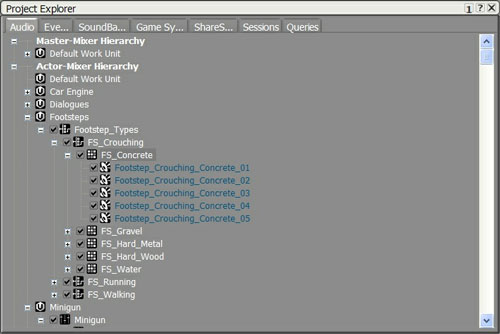
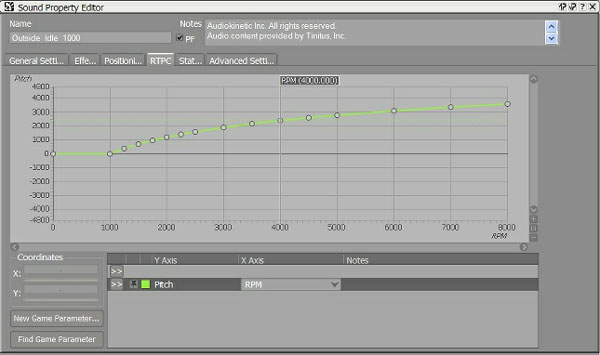
Objects have properties like volume, pitch, low-pass filtering, positioning, and so on. These properties may be changed at run-time by Game Syncs. Some of them are discrete, like the States, mentioned above. Others are continuous, like the Game Parameter, which can be changed through run-time parameter control (RTPC). RTPCs use mapping curves where a sound property is mapped to a parameter in game (see screenshot below).
Usually, objects inherit the properties of their parents, unless they explicitly override them. You will soon see that the principle of inheritance and overriding is fundamental in Wwise, and is used extensively in the interactive music feature set.